Multi-agent orchestration in OpenClaw: how does it work under the hood?
Introduction
OpenClaw has sparked major discussion since its launch. It is a leading entity in the sector, though views on its development vary.
Some experts categorize OpenClaw as a type of AI that has achieved artificial intelligence. Others view it as a foundational step toward genuine model intelligence.
Technical pros naturally want to analyze OpenClaw’s internal architecture. Examining this logic is simple because OpenClaw is an open-source project built on Node.js.
The source code is accessible on GitHub for review. OpenClaw is not sentient; it lacks independent thought. It operates as a structured system of inputs, queues, and loops. Public demos show agents calling owners or holding complex chats. Some agents even monitor social media to perform self-optimization.
Many now question if the system is sentient. There is concern that we have crossed into uncontrollable territory. Our review confirms the system relies on engineering rather than "magic."
Basics
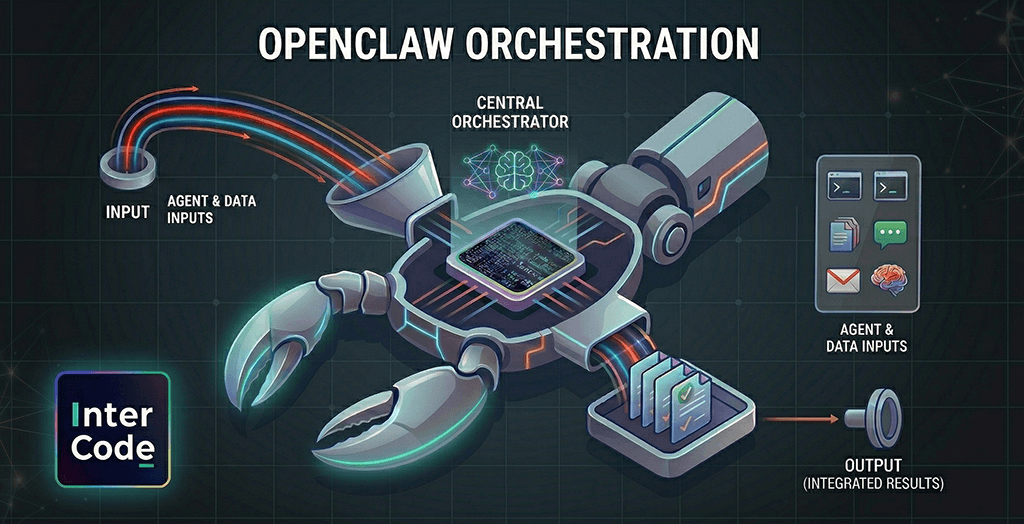
PSPDFKit developer Peter Steinberger created the personal AI assistant OpenClaw. This framework provides the core infrastructure for agent operations. OpenClaw runs as an agent runtime managed by a gateway. This gateway routes all incoming inputs to the correct agents.
Agents execute workloads while the gateway regulates traffic. This gateway is the primary component for understanding the system.
It is a persistent process on your local machine that maintains active connections. This OpenClaw integration links directly to your messaging apps.
It supports WhatsApp, Discord, Microsoft Teams, and Slack. It routes data to agents that execute localized commands on your hardware.
The gateway does not make autonomous decisions. Its sole function is to ingest inputs and direct them to the right place. OpenClaw processes many data streams, not just chat messages. This multifaceted input handling is its core function.
Five primary input categories create an autonomous appearance. In reality, the system is reactive. It responds to triggers rather than internal intent. Diverse data sources drive daily operations. These include natural language interactions and automated heartbeats.
The system uses cron jobs, internal hooks, and external webhooks. Additionally, agents facilitate inter-agent communication.

Messages
Messages are the most intuitive input category. When you send a text via WhatsApp or Slack, the gateway intercepts the data.
It then routes the message to an agent to generate a response. The standard flow follows a request-response model.
A critical feature is the management of channel-specific sessions. Contacting the service via different apps creates distinct sessions. Each maintains its own independent context.
Heartbeats
The "heartbeat" is a sophisticated technical feature. It is essentially a recurring timer. By default, this timer triggers every 30 minutes.
When it fires, the gateway schedules an agent turn. The agent receives a prompt to scan an inbox or review a calendar for overdue tasks. The agent operates strictly on these instructions. It leverages connected resources to aggregate data.
It then generates a report to enhance productivity. This allows the user to stay informed without manual queries.
The agent issues a silent "Heartbeat OK" token if it finds no urgent issues. This prevents unnecessary notifications. If an item requires attention, the system initiates a ping. This is how the system completes tasks without human intervention.
Users can define agent behavior, active hours, and check frequency. At its core, the system treats time as a primary input.
This architecture is why OpenClaw appears proactive. The agent executes complex tasks even when you are not online. It is simply responding to timer events.
Cron jobs
Crons provide more control than heartbeats. You can define precise execution times and instructions for specific work.
For example, you could schedule a cron to flag urgent emails at 9:00 AM daily. You could also instruct an agent to archive social media posts at midnight.
A cron job acts as a scheduled event tied to a prompt. When the time occurs, the event triggers and sends the prompt to the agent.
Consider an agent messaging a user's family. This was not an autonomous choice, but a programmed cron job. The agent simply processed the prompt when the timer fired.
Internal hooks
The system uses hooks to manage internal state changes. The system itself triggers these specific events.
A hook fires when the gateway starts or an agent begins a task. This creates an event-driven environment.
This is how OpenClaw manages internal resources. It can optimize memory or run setup instructions before an agent executes.
External webhooks
Webhooks allow external platforms to talk to OpenClaw. These have been a standard tool for years.
When a new email arrives, a webhook notifies OpenClaw instantly. It functions as a digital notification system.
The system ingests data from platforms like Jira or GitHub. It even integrates with supply chain tools via webhooks. Your agent reacts to your entire digital environment. It can process emails, issue reminders, or research tickets.
When running OpenClaw, you simply provide the necessary api key. This establishes a unified connection across your digital life.
Inter-agent communication
OpenClaw supports multi-agent setups through inter-agent messaging. This allows separate agents to operate within isolated workspaces.
Agents exchange data to coordinate on larger objectives. This creates a robust workflow.
You can assign specialized profiles to individual agents. For instance, one might act as a research specialist leveraging large language models.
Another might serve as a writing agent. When one finishes a task, it places the output into a queue for the next agent.
This looks like collaboration, but it is really the management of message queues. This architecture enables advanced features within modern ai systems.
Debrief of the initial example
An agent initiating a call at 3:00 AM may appear autonomous. It gives the impression that the agent "decided" to act.
However, the mechanism is purely logical. The process follows a strict sequence:
Here's the mechanism:
- Event trigger: A cron job or heartbeat fires.
- Queue processing: The agent ingests the event once it enters the queue.
- Execution: The agent follows instructions to initiate the call.
The owner did not prompt this action in the moment. Instead, this behavior was enabled during the agent's initial setup. No "thinking" or "deciding" took place overnight.
The process is simply: Time produced an event -> The event kicked off the agent -> The agent followed its instructions.
Time creates events through heartbeats and cron jobs. Humans create events through messages. External systems create events through webhooks. Internal state changes create events through hooks. And agents create events for other agents. All of them enter a queue. The queue gets processed. Agents execute. State persists. And that's the key.
OpenClaw uses local markdown files for long-term storage. These files house your preferences and history.
This allows the agent to reference previous contexts. It appears to "remember" and make informed decisions.
OpenClaw does not learn in real time. It operates on a continuous loop of reading and writing to text files.
This deep system access is what empowers OpenClaw’s capabilities. We will explore more in a future post to help you get OpenCLaw onboard for your projects.

Conclusion
This AI-powered, general purpose framework relies on four core components (not on magic):
- Time: The catalyst for new events.
- Events: The triggers that activate agents.
- State: The persistence of data.
- Loop: The process that maintains the system.
Any AI agent framework that feels "alive" uses this architecture. It is a persistent process driven by heartbeats, crons, or internal loops.
At Intercode, we are actively developing components of these architectural components. We use ingestion jobs to categorize reviews.
Reaching specific thresholds triggers these events. Similarly, a chatbot message can activate tools to generate tickets.
An agent can even identify negative trends to trigger smart alerts. These components are the foundation of complex, automated systems.
These simple, interconnected components are the foundation for building complex systems – a task that necessitates the expertise of a software engineer.
These simple, interconnected components are the foundation for building complex systems – a task that necessitates the expertise of a software engineer.
 20 likes